

HarmonyOS 用List组件实现组合列表项
创始人
2024-11-05 01:40:16
界面分析:
由于整体UX设计图符合从上至下的布局,所以可以采用Column组件作为外层容器
简介:
- 最上方的标题可以使用Text组件进行加载渲染
- 中间的Banner图和简介分别可以使用Image组件和Text组件进行加载
- 最后一部分可以看作是一个列表,它由若干个列表项ListItem构成
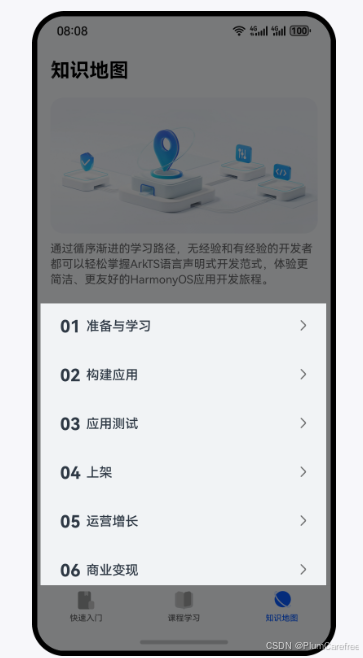
实现标题、Banner、简介:
- 标题栏可以采用Text组件进行加载渲染
1. Column() { 2. Text('标题') 3. .fontFamily('HarmonyHeiTi-Bold') 4. .fontSize(24) 5. .fontColor(Color.Black) 6. .textAlign(TextAlign.Start) 7. .lineHeight(33) 8. .fontWeight(700) 9. .width('100%') 10. } 11. .padding({ top: 12, right: 16, bottom: 12, left: 16}) 12. .backgroundColor('#F1F3F5') - 放入图片资源:./src/main/resources/base/media目录中
- 使用Image组件加载放入的Banner图片,设置其宽度百分百,并设置圆角。同时注意到banner图与上方的title间有19单位的空隙,与下方的组件有8单位的空隙
1. Image($r('app.media.yourpicture')) 2. .width('100%') 3. .borderRadius(16) 4. .margin({ top: 19, bottom: 8 }) - 简介的部分也可以采用Text组件来进行数据的渲染
1. Text('简介') 2. .fontFamily('HarmonyHeiTi') 3. .fontSize(14) 4. .fontColor('rgba(0,0,0,0.60)') 5. .fontWeight(400) 6. .textAlign(TextAlign.Start) - 实现List的列表项
// @Component功能更加多样,有自己的生命周期,还能支持预览效果 // 而@Builder更加轻量,能满足基础的组件封装,性能更好,但是不支持预览 1. @Component 2. export struct Item { 3. build() { 4. Row(){ 6. } 7. .width('100%') 8. .height(48) 9. .borderRadius(16) 10. .alignItems(VerticalAlign.Center) 11. .padding({ left: 12, right: 12 }) 12. .backgroundColor('#F1F3F5') 13. } 14. } - 导出数据接口
1. export struct Item { 2. @State navBarItem: NavBarItemType = { 3. order: '01', 4. title: '标题' 5. }; 6. ... 7. } - 实现序号
1. @Component 2. export struct Item { 3. ... 5. build() { 6. Row() { 7. Text(this.navBarItem.order) 8. .margin({ right: 6 }) 9. .fontFamily('HarmonyHeiTi-Bold') 10. .fontSize(21) 11. .fontColor('#182431') 12. .textAlign(TextAlign.Start) 13. .lineHeight(22) 14. .fontWeight(700) 15. } 16. ... 17. } 18. } - 实现标题
1. @Component 2. export struct Item { 3. ... 5. build() { 6. Row() { 7. Text(this.navBarItem.order) 8. ... 9. Text(this.navBarItem.title) 10. .fontFamily('HarmonyHeiTi-Medium') 11. .fontSize(16) 12. .fontColor('#182431') 13. .textAlign(TextAlign.Start) 14. .lineHeight(22) 15. .fontWeight(500) 16. } 18. } 19. } - 将指向下一页的图标放置于 ./src/main/resources/base/media目录下,并填充
1. @Component 2. export struct Item { 3. ... 5. build() { 6. Row() { 7. Text(this.navBarItem.order) 8. ... 9. Text(this.navBarItem.title) 10. ... 11. Blank() 12. Image($r('app.media.ic_arrow')) 13. .width(12) 14. .height(24) 15. } 16. ... 17. } 18. } 组合列表项:
- 定义数据集,在分栏Tab的首页进行定义
1. @State navBarList: NavBarItemType[] = [ 2. { order: '01', title: '准备与学习' }, 3. { order: '02', title: '构建应用' }, 4. { order: '03', title: '应用测试' }, 5. { order: '04', title: '上架' }, 6. { order: '05', title: '运营增长' }, 7. { order: '06', title: '商业变现' }, 8. { order: '07', title: '更多' } 9. ]; - 循环渲染
1. List({ space: 12 }) { 2. ForEach(this.navBarList, (item: NavBarItemType, index: number) => { 3. ListItem() { 4. NavBarItem({ navBarItem: item }) 5. } 6. .width('100%') 7. }, (item: NavBarItemType): string => item.title) 8. } 9. .width('100%') 10. .margin({ top: 24 }) - 在build()函数中,加入Scroll组件。可以解决当内容条数不足时,Scroll组件滚动时会出现空白区域的错误效果。edgeEffect用于设置边缘滑动效果,设置为EdgeEffect.Spring表示设置为弹性物理动效
相关内容
热门资讯
裸辞做“一人公司”,我后悔了
去年这个时候,一位以色列程序员正在东南亚旅行。他顺手把一个在脑子里转了很久的想法做成了产品,一个让任...
南京建成国内首个Pre-6G试...
4月21日,2026全球6G技术与产业生态大会在南京开幕。全息互动技术展台前,一名远在北京的工作人员...
超梵求职受邀参加“2025抖音...
超梵求职受邀参加“2025抖音巨量引擎成人教育行业生态大会”,探讨分享优质内容传播,服务万千学员。 ...
摩托罗拉Razr 2026(R...
IT之家 4 月 22 日消息,摩托罗拉宣布新一代 Razr 折叠手机将于 4 月 29 日在美国发...
库克卸任,特纳斯领航:苹果新纪...
苹果首席执行官蒂姆·库克将卸任,硬件工程主管约翰·特纳斯将接任,苹果公司今天宣布此事。 库克将在夏季...