

EasyPoi实现动态列的导入导出(固定列+自定义列)-横向(动态行头)+纵向-java
创始人
2024-11-06 02:39:00
文章目录
- 导入jar包
- 纵向导入导出:
- 实体类
- 导出
- 导入
- 横向动态列导入导出(行头动态生成)
- 解决方案
- 导出
- 导入
- 补充ObjectValueUtils工具类
导入jar包
cn.afterturn easypoi-base 4.3.0 cn.afterturn easypoi-web 4.3.0 cn.afterturn easypoi-annotation 4.3.0 easyPoi开发文档: easyPoi开发文档
纵向导入导出:
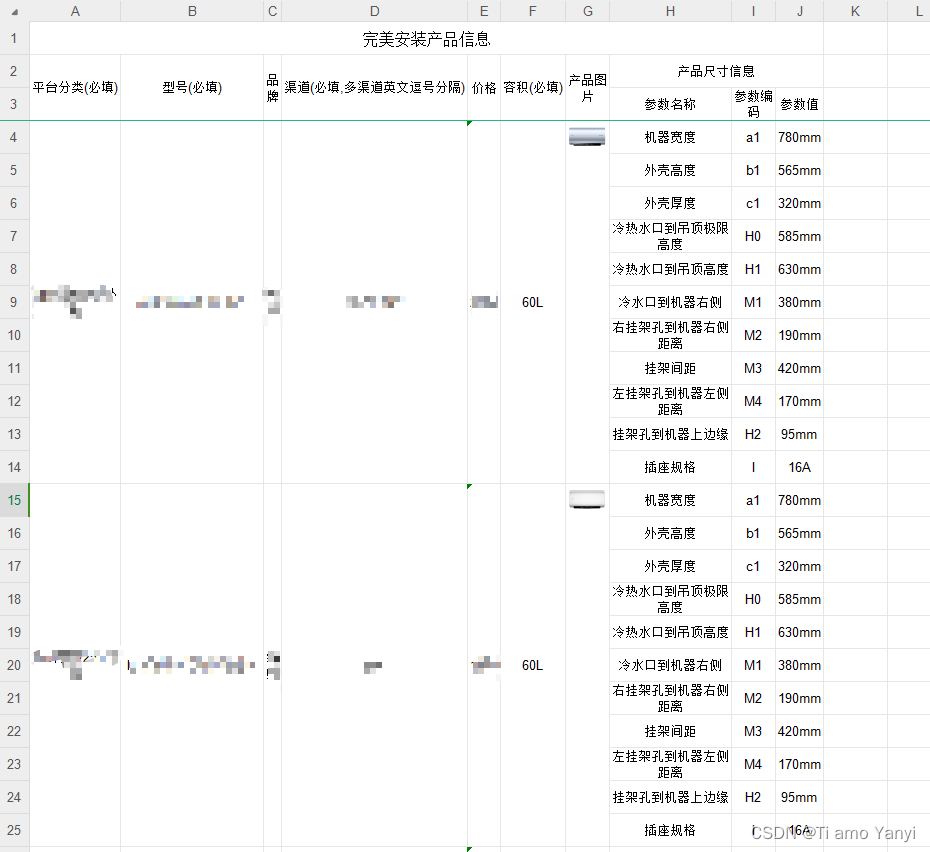
项目需要导入导出数据,包含基本信息和规格参数List信息,最初采用easyPoi的注解导出,实现效果如下:
其中基本信息固定, 但产品尺寸信息List根据所属平台不同数量及名称不定
实体类
TbInstallProductVo对象纵向合并所用实体类注解:

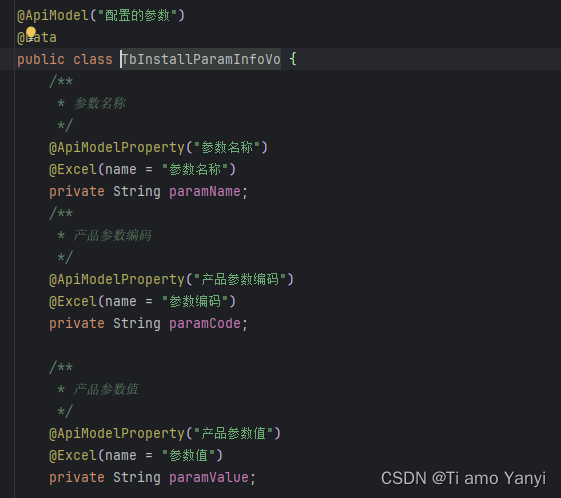
除了@Excel注解, 主要使用了
@ExcelCollection来实现导出集合的效果, 具体实现方法可以去官网查看

导出
//设置导出参数,获得工作簿,response返回 ExportParams exportParams = new ExportParams("完美安装产品信息", "产品信息"); Workbook wb = ExcelExportUtil.exportExcel(exportParams, TbInstallProductVo.class, list); try { response.setContentType("application/vnd.openxmlformats-officedocument.spreadsheetml.sheet"); response.setCharacterEncoding("utf-8"); response.setHeader("Content-Disposition", "attachment;filename=" + URLEncoder.encode("导出完美安装产品信息" + System.currentTimeMillis(), "UTF-8")); wb.write(response.getOutputStream()); } catch (IOException e) { throw new RuntimeException(e); } IOUtils.closeQuietly(wb); 导入
public AjaxResult importData(MultipartFile file, Boolean updateSupport) { //设置导入参数, ImportParams importParams = new ImportParams(); //表格标题行数,默认0 importParams.setTitleRows(1); //表头行数,默认1 importParams.setHeadRows(2); List productVoList; try { productVoList = ExcelImportUtil.importExcel(file.getInputStream(), TbInstallProductVo.class, importParams); } catch (Exception e) { throw new RuntimeException("读取excel数据异常null"); } if (StringUtils.isNotEmpty(productVoList)) { //导入信息 return importProductInfoAndParamInfo(updateSupport, productVoList); } else { return AjaxResult.error("导入数据不能为空!"); } } 横向动态列导入导出(行头动态生成)
现在需要按平台分类将产品规格信息的动态List的参数名称横置为列名,参数值为数据,形成不同导入导出模板,,必须采用动态列进行导入导出,实现效果如下:
解决方案
Java反射机制根据@Excel注解获取需要的参数+动态拼装ExcelExportEntity实现List动态行头
其中:基于List 的导出,ExcelExportEntity是注解经过处理翻译成的实体类,两者几乎是一对的,所以如果我们要动态自定义导出列,我们只要动态拼装ExcelExportEntity就可以实现不固定参数, 由于行头的名称也是数据库读取内容, 因此需要用java反射获取参数名称字段的内容作为行头
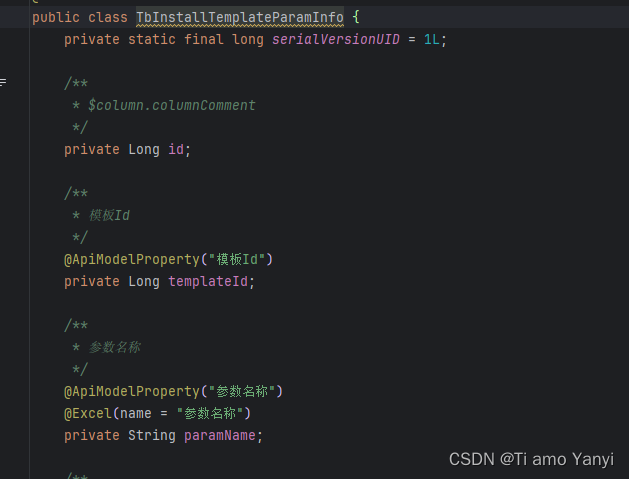
模板类对象
导出
public void export(HttpServletResponse response, Long[] ids) { try { //业务数据查询 List productVoList = tbInstallProductInfoService.selectTbInstallProductInfoListForExportV1(ids); List> dataList = new ArrayList<>(); //数据转为List 根据类中注解通过反射构建行头
private List getExcelExportEntityList() throws Exception { Class templateClass = TbInstallProductVo.class; //获取所有Excel注解的字段 List fields = FieldUtils.getFieldsListWithAnnotation(templateClass, Excel.class); //获取参数值字段的注解 Field parmaFiled = TbInstallParamInfoVo.class.getDeclaredField("paramName"); List excelExportEntities = new ArrayList<>(); //获取基本信息导出-基本信息以Excel注解值为行头 //@ExcelTarget 这个是作用于最外层的对象,描述这个对象的id,以便支持一个对象可以针对不同导出做出不同处理 ExcelTarget etarget = (ExcelTarget) templateClass.getAnnotation(ExcelTarget.class); String targetId = etarget == null ? null : etarget.value(); if (StringUtils.isNotEmpty(fields)) { //循环带Excel注解的字段,获取Excel注解的name作为行头----固定的基本信息用此方式获取行头名称 for (Field field : fields) { if (field.getAnnotation(Excel.class) != null) { Excel excel = (Excel) field.getAnnotation(Excel.class); String name = PoiPublicUtil.getValueByTargetId(excel.name(), targetId, (String) null); if (StringUtils.isNotBlank(name)) { //构建ExcelExportEntity ExcelExportEntity excelExportEntity = this.createExcelExportEntity(field, targetId, templateClass, null, (ExcelEntity) null); excelExportEntity.setKey(name); excelExportEntities.add(excelExportEntity); } } } } //根据模板动态加入需要导出的字段---动态列,行头名为数据paramName值 //获取该模板的数据(业务) TbInstallTemplateParamInfo temParamParmas = new TbInstallTemplateParamInfo(); temParamParmas.setTemplateId(-1L); List templateParamInfoList = tbInstallTemplateParamInfoMapper.selectTbInstallTemplateParamInfoList(temParamParmas); if (StringUtils.isNotEmpty(templateParamInfoList)) { //循环模板的参数 for (int i = 0; i < templateParamInfoList.size(); i++) { //判断参数名称字段是否存在有效注解 if (parmaFiled.getAnnotation(Excel.class) != null) { Excel excel = (Excel) parmaFiled.getAnnotation(Excel.class); String name = PoiPublicUtil.getValueByTargetId(excel.name(), targetId, (String) null); if (StringUtils.isNotBlank(name)) { //存在注解,设置行头名称为参数值,并设置导出排序 ExcelExportEntity excelExportEntity = this.createExcelExportEntity(parmaFiled, targetId, TbInstallParamInfoVo.class, null, (ExcelEntity) null); excelExportEntity.setName(templateParamInfoList.get(i).getParamName()); excelExportEntity.setOrderNum(fields.size() + i); excelExportEntity.setKey(templateParamInfoList.get(i).getParamName()); excelExportEntities.add(excelExportEntity); } } } } //返回固定列+该模板动态列格式 return excelExportEntities; } 业务数据转为
List
private Map getExportDataMap(TbInstallProductVo productVo) throws Exception { Class templateClass = TbInstallProductVo.class; List fields = FieldUtils.getFieldsListWithAnnotation(templateClass, Excel.class); //获取参数值字段的注解 Field parmaFiled = TbInstallParamInfoVo.class.getDeclaredField("paramName"); Map map = new HashMap<>(); //获取基本信息的数据 ExcelTarget etarget = (ExcelTarget) templateClass.getAnnotation(ExcelTarget.class); String targetId = etarget == null ? null : etarget.value(); if (StringUtils.isNotEmpty(fields)) { for (Field field : fields) { if (field.getAnnotation(Excel.class) != null) { Excel excel = (Excel) field.getAnnotation(Excel.class); String name = PoiPublicUtil.getValueByTargetId(excel.name(), targetId, (String) null); if (StringUtils.isNotBlank(name)) { field.setAccessible(true); map.put(name, ObjectValueUtils.getValue(field.get(productVo), field.getType())); } } } } //根据productVo生成参数数据存入map if (StringUtils.isNotEmpty(productVo.getParamInfoVoList())) { for (int i = 0; i < productVo.getParamInfoVoList().size(); i++) { if (parmaFiled.getAnnotation(Excel.class) != null) { Excel excel = (Excel) parmaFiled.getAnnotation(Excel.class); String name = PoiPublicUtil.getValueByTargetId(excel.name(), targetId, (String) null); if (StringUtils.isNotBlank(name)) { //<参数名称,参数值> map.put(productVo.getParamInfoVoList().get(i).getParamName(), productVo.getParamInfoVoList().get(i).getParamValue()); } } } } return map; } 导入
public AjaxResult importData(MultipartFile file, Boolean updateSupport) { Class importClass = TbInstallProductVo.class; List> mapList = null; List productVoList = new ArrayList<>(); try { ImportParams importParams = new ImportParams(); importParams.setTitleRows(1); importParams.setHeadRows(1); //获取导入的数据,按<行头,内容>格式 mapList = ExcelImportUtil.importExcel(file.getInputStream(), Map.class, importParams); } catch (Exception e) { throw new RuntimeException("读取excel数据异常" + e); } if (StringUtils.isEmpty(mapList)) { throw new ServiceException("导入产品数据为空!"); } //获取固定参数 List fields = FieldUtils.getFieldsListWithAnnotation(importClass, Excel.class); ExcelTarget etarget = (ExcelTarget) importClass.getAnnotation(ExcelTarget.class); String targetId = etarget == null ? null : etarget.value(); //根据模板动态加入需要导出的字段 TbInstallTemplateParamInfo temParamParmas = new TbInstallTemplateParamInfo(); temParamParmas.setTemplateId(-1L); List templateParamInfoList = tbInstallTemplateParamInfoMapper.selectTbInstallTemplateParamInfoList(temParamParmas); try { for (Map map : mapList) { //构建导入数据List TbInstallProductVo productVo = importClass.newInstance(); //构建固定字段-固定字段以注解为行头 if (StringUtils.isNotEmpty(fields)) { for (Field field : fields) { if (field.getAnnotation(Excel.class) != null) { Excel excel = (Excel) field.getAnnotation(Excel.class); String excelName = PoiPublicUtil.getValueByTargetId(excel.name(), targetId, (String) null); if (StringUtils.isNotBlank(excelName)) { //设置允许访问,并强制类型转换解决解析类型冲突 field.setAccessible(true); //设置参数值为导入的数据 field.set(productVo, ObjectValueUtils.getValue(map.get(excelName), field.getType())); } } } } //构建不定产品参数 if (StringUtils.isNotEmpty(templateParamInfoList)) { List paramInfoVoList = new ArrayList<>(); for (TbInstallTemplateParamInfo tempParamInfo : templateParamInfoList) { //设置参数对象以构建自定义参数List TbInstallParamInfoVo paramInfoVo = new TbInstallParamInfoVo(); paramInfoVo.setParamName(tempParamInfo.getParamName()); paramInfoVo.setParamCode(tempParamInfo.getParamCode()); paramInfoVo.setParamValue(String.valueOf(map.get(tempParamInfo.getParamName()))); paramInfoVoList.add(paramInfoVo); } productVo.setParamInfoVoList(paramInfoVoList); } productVoList.add(productVo); } log.info("完美安装导入的数据=={}", productVoList); } catch (Exception e) { throw new RuntimeException("数据解析错误,请检查数据内容" + e); } //导入数据-业务逻辑 return tbInstallProductInfoServiceImpl.importProductInfoAndParamInfo(updateSupport, productVoList); } 参考: EasyPoi导入与导出_easypoi map格式导出_阿里巴巴P8资深技术专家的博客-CSDN博客
补充ObjectValueUtils工具类
import java.text.ParseException; import java.util.Date; /** * @author Shenpeng * @Date 2023/11/27/16:21 * @Description */ public class ObjectValueUtils { /** * description 根据类型class转换类型值 * * @param value: * @param type: * @return :Object */ public static Object getValue(Object value, Class type) throws ParseException { if (value != null) { if (type.isAssignableFrom(String.class)) return toString(value); if (type.isAssignableFrom(Integer.class) || type.isAssignableFrom(int.class)) return toInteger(value); if (type.isAssignableFrom(Long.class) || type.isAssignableFrom(long.class)) return toLong(value); if (type.isAssignableFrom(Boolean.class) || type.isAssignableFrom(boolean.class)) return toBoolean(value); if (type.isAssignableFrom(Double.class) || type.isAssignableFrom(double.class)) return toDouble(value); if (type.isAssignableFrom(Date.class)) return toDate(value); if (type.isAssignableFrom(String[].class)) return toStringArray(value); if (type.isAssignableFrom(Integer[].class)) return toIntegerArray(value); } return value; } private static String[] toStringArray(Object value) { return value.toString().split(","); } private static Integer[] toIntegerArray(Object value) { String[] stringArray = toStringArray(value); Integer[] intArray = new Integer[stringArray.length]; for (int i = 0; i < stringArray.length; i++) { intArray[i] = Integer.parseInt(stringArray[i]); } return intArray; } private static Integer toInteger(Object value) { return Integer.parseInt(value.toString()); } private static Long toLong(Object value) { return Long.parseLong(value.toString()); } private static Double toDouble(Object value) { return Double.parseDouble(value.toString()); } private static String toString(Object value) { return value.toString(); } private static Date toDate(Object value) throws ParseException { return DateUtils.parseDate(value.toString(), DateUtils.YYYY_MM_DD); } private static Boolean toBoolean(Object value) { return Boolean.parseBoolean(value.toString()); } } 相关内容
热门资讯
裸辞做“一人公司”,我后悔了
去年这个时候,一位以色列程序员正在东南亚旅行。他顺手把一个在脑子里转了很久的想法做成了产品,一个让任...
南京建成国内首个Pre-6G试...
4月21日,2026全球6G技术与产业生态大会在南京开幕。全息互动技术展台前,一名远在北京的工作人员...
超梵求职受邀参加“2025抖音...
超梵求职受邀参加“2025抖音巨量引擎成人教育行业生态大会”,探讨分享优质内容传播,服务万千学员。 ...
摩托罗拉Razr 2026(R...
IT之家 4 月 22 日消息,摩托罗拉宣布新一代 Razr 折叠手机将于 4 月 29 日在美国发...
库克卸任,特纳斯领航:苹果新纪...
苹果首席执行官蒂姆·库克将卸任,硬件工程主管约翰·特纳斯将接任,苹果公司今天宣布此事。 库克将在夏季...