

MYSQL JSON数据类型详解
前言:
从MySQL 5.7.8开始支持原生JSON(RFC 7159规范定义)数据类型,可以更加高效的存储和管理JSON文档。
与在字符数据类型中存储json数据相比,原生JSON数据类型提供了自动的格式验证以及优化的存储格式,可以快速访问文档中的元素节点。
JSON数据最大长度不能超过max_allowed_packet的限制。
1、快速开始:
常见的json数据有以下格式:
JSON 数组包含一系列用逗号分隔并用[ ]字符括起来的值
["abc", 10, null, true, false]JSON 对象包含一组键值对,用逗号分隔,并用 { } 字符括起来
{"k1": "value", "k2": 10}创建表:
create table study_json_user ( id bigint not null auto_increment primary key, user_info json not null comment '用户信息', hobby json null comment '爱好' ) comment '学习json的用户';新增数据:
insert into study_json_user (user_info, hobby) values ('{ "name": "张三", "gender": "男", "age": 30, "birthdate": "1992-01-01", "nationality": "中国", "address": { "street": "南京路123号", "city": "上海市", "province": "上海市", "postalCode": "123456" }, "contact": { "phone": "13800138000", "email": "zhangsan@example.com" }, "occupation": "软件工程师", "education": "本科", "height": 175 }', '[ "coding", "reading" ]');查询数据:
select * from study_json_user where json_extract(user_info, '$.name') = '张三'; select * from study_json_user where user_info -> '$.name' = '张三';json_extract 函数以JSON格式提取字段中的值,$.name表达式中$代表user_info,name表示user_info中的name属性。
json_extract也可以用 -> 替换。
修改数据:
JSON_SET(), JSON_REPLACE(), or JSON_REMOVE()
update study_json_user set user_info = json_set(user_info, '$.name', '李四') where id = 1;删除数据:
update study_json_user set hobby = null;注:以上函数对于字符类型(VARCHAR,TEXT...)字段也同样生效。
2,进阶使用
user_info中有很多属性,当我们想对某个参数进行搜索时,如果使用下列函数查询是需要全表搜索的,因为我们没对被查询字段加索引。
json_extract(user_info, '$.name') = '张三'; 我们可以加一个虚拟列
alter table study_json_user add column name varchar(50) generated always as (user_info -> '$.name') virtual null comment '姓名';该列由user_info中的name属性构成。virtual代表该列的数据不会存在数据库中,而是使用到该列式从我们定义的表达式(generated always as (user_info -> '$.name'))生成。与virtual对应的是stored,代表该列的数据会存在数据库中。
回到一开始的目的,我们要对name进行搜索
select * from study_json_user where name = '张三' 查询结果为空。查询数据库中的name字段数据,发现name字段数据外层有引号。

所以在这里我们要用到JSON_UNQUOTE(),等同于 ->>
用来取消 JSON 值的引号,并以 utf8mb4 字符串形式返回结果。
修改生成name列的sql语句为:
alter table study_json_user add column name varchar(50) generated always as (json_unquote(user_info -> '$.name') ) stored null comment '姓名';执行查询能正确返回结果,我们查询执行结果,发现是全表扫描:
explain select * from study_json_user where name = '张三'
回到一开始的目的,我们要对name进行搜索,现在有了name列,我们还需要将name列设置为索引。
alter table study_json_user add index idx_name (name);再次查询,发现设置的索引生效了:

注:当只对json数据中的某些字段进行索引时,用字符类型(VARCHAR...)存储更节约空间,因为JSON格式除了存储元数据,还会花额外的空间存储JSON相关的结果,用于快速访问数据而不是实时解析JSON。
当我们更新user_info中的数据后,发现name数据随着更新了,我们只需要关注user_info中的数据即可。
update study_json_user set user_info ='{ "name": "钱七", "gender": "男", "age": 30, "birthdate": "1992-01-01", "nationality": "中国", "address": { "street": "南京路123号", "city": "上海市", "province": "上海市", "postalCode": "123456" }, "contact": { "phone": "13800138000", "email": "zhangsan@example.com" }, "occupation": "软件工程师", "education": "本科", "height": 175 }' where id = 1
当我们手动更新name字段时,发现报错了,所以在各类ORM框架中在insert,update时要排除掉该字段。
update study_json_user set name='赵六' where id = 1;
当user_info中不存在name属性时,user_info -> '$.name'得到的值是mysql中的null值。
当user_info中的name属性为null时,user_info -> '$.name'得到的值是JSON中的null值。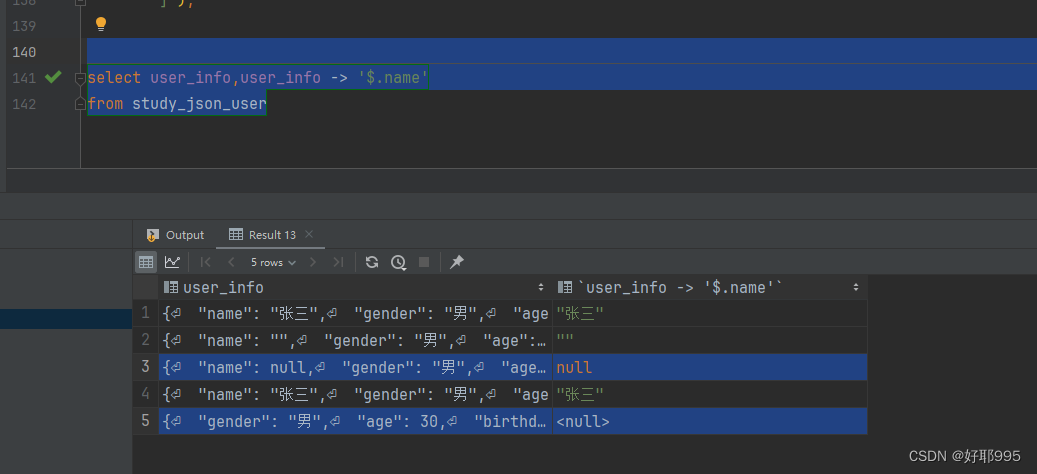
当user_info中不存在name属性时,json_unquote(user_info -> '$.name')的值为mysql中的null值。
当user_info中的name属性为null时,json_unquote(user_info -> '$.name')的值为‘null’,一个字符串的null。
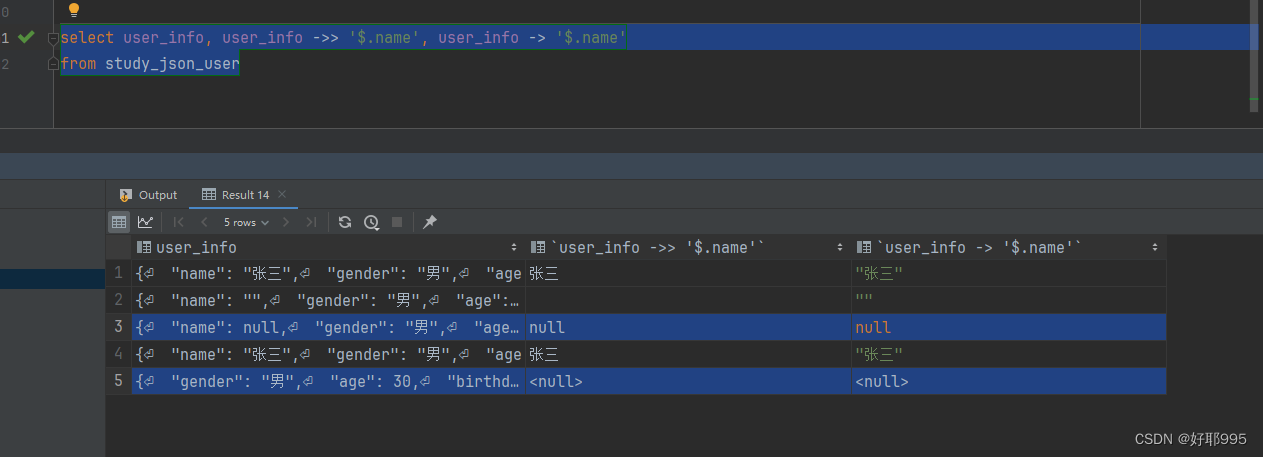
所以我们要对这两种情况做额外判断,统一设置为mysql中的null类型:
(json_type返回值为JSON数据内字段类型)
case when user_info -> '$.name' is null or json_type(user_info -> '$.name') = 'NULL' then null else user_info ->> '$.name' end3,总结
将上述的表结构整合:
create table study_json_user ( id bigint not null auto_increment primary key, user_info text not null comment '用户信息', name varchar(50) generated always as (case when user_info -> '$.name' is null or json_type(user_info -> '$.name') = 'NULL' then null else user_info ->> '$.name' end) stored null comment '姓名', hobby text null comment '爱好', index idx_name (`name`) ) comment '学习json的用户';(将user_info的JSON格式替换成了text,我们用不到JSON格式的特性,所以用text节约少许存储空间)
查询语句:
select * from study_json_user where name = '张三'extra:
mysql的JSON格式各版本差异特性-CSDN博客
mysql-json学习记录-CSDN博客
上一篇:Rust 中的引用与借用
下一篇:mysql 锁表确认及解除锁表