

swagger配置使用及自定义安全方案securitySchemes
创始人
2024-11-10 09:41:14
1.导入swagger依赖
这里使用的是springfox-boot-starter,同时导入knife4j插件(不导入也行,导入可以方便接口调试)。
io.springfox springfox-boot-starter 3.0.0 com.github.xiaoymin knife4j-spring-boot-starter 3.0.3 接下来编写swagger配置类
@Configuration @EnableOpenApi @EnableKnife4j public class Knife4jConfig { @Bean public Docket defaultApi2() { return new Docket(DocumentationType.OAS_30) .apiInfo(apiInfo()) //分组名称 // .groupName("2.X版本") .select() //这里指定Controller扫描包路径 .apis(RequestHandlerSelectors.basePackage("")) .paths(PathSelectors.any()) .build() .securitySchemes(securitySchemes()) .securityContexts(securityContexts()); } private ApiInfo apiInfo() { return new ApiInfoBuilder() .title("项目名称") .version("1.0") .build(); } private List securitySchemes() { List securitySchemeList = new ArrayList<>(); securitySchemeList.add(new HttpAuthenticationScheme("Authorization", "JWT授权(数据将在请求头中进行传递)直接在下面框中输入token", "http", "Bearer", "JWT", new ArrayList<>() )); return securitySchemeList; } //过滤不需要进行验证的页面 private List securityContexts() { List securityContexts = new ArrayList<>(); securityContexts.add( SecurityContext.builder() .securityReferences(defaultAuth()) //这些接口不用提供token即可访问。 .forPaths(PathSelectors.regex("^(?!/employee/login).*$")) .forPaths(PathSelectors.regex("^(?!/identifyImageBase64).*$")) .build()); return securityContexts; } //全局的token配置 private List defaultAuth() { List securityReferences = new ArrayList<>(); securityReferences.add(new SecurityReference("Authorization", new AuthorizationScope[0])); return securityReferences; } } 在swagger文档中效果如下
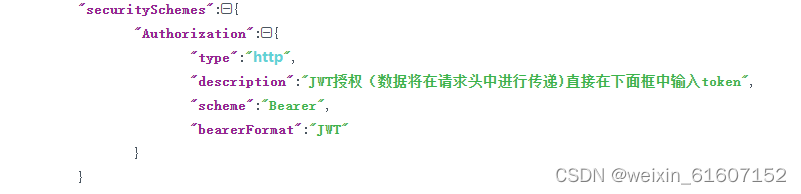
在/swagger-ui/index.html#/中可以全局配置token,并自动过滤不需要token的接口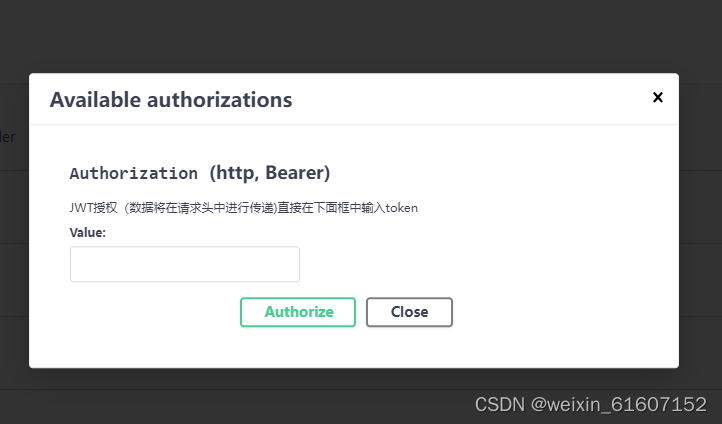
在knife4j文档中也可以实现配置全局token

结束。
相关内容
热门资讯
裸辞做“一人公司”,我后悔了
去年这个时候,一位以色列程序员正在东南亚旅行。他顺手把一个在脑子里转了很久的想法做成了产品,一个让任...
南京建成国内首个Pre-6G试...
4月21日,2026全球6G技术与产业生态大会在南京开幕。全息互动技术展台前,一名远在北京的工作人员...
超梵求职受邀参加“2025抖音...
超梵求职受邀参加“2025抖音巨量引擎成人教育行业生态大会”,探讨分享优质内容传播,服务万千学员。 ...
摩托罗拉Razr 2026(R...
IT之家 4 月 22 日消息,摩托罗拉宣布新一代 Razr 折叠手机将于 4 月 29 日在美国发...
库克卸任,特纳斯领航:苹果新纪...
苹果首席执行官蒂姆·库克将卸任,硬件工程主管约翰·特纳斯将接任,苹果公司今天宣布此事。 库克将在夏季...