

arkTS开发鸿蒙OS应用(登录页面实现,连接数据库)
创始人
2024-11-10 10:37:35
前言
喜欢的朋友可在抖音、小红书、微信公众号、哔哩哔哩搜索“淼学派对”。知乎搜索“编程淼”。
前端架构
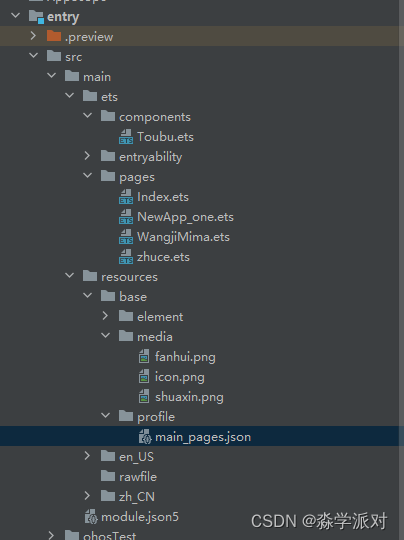
Toubu.ets
import router from '@ohos.router' @Component export struct Header{ build(){ // 标题部分 Row({space:5}){ Image($r('app.media.fanhui')) .width(20) .onClick(() =>{ router.back() }) Blank() Image($r('app.media.shuaxin')) .width(30) } .width('98%') .height(30) } }Index.ets
import axios from '@ohos/axios' import router from '@ohos.router' @Entry @Component struct Index { // 上传数据 @State zhanghao: string = '' @State mima: string = '' @State zhanghao_find:string ='' @State mima_find:string ='' build() { Column() { Text('龙年千帆启鸿蒙') .margin({top:70}) .fontWeight(FontWeight.Bold) .fontSize(30) Image($r('app.media.icon')) .width(150) .margin({top:50,bottom:20}) // 账号登录 TextInput({placeholder:'账号'}) .margin(20) .height(50) .onChange(value =>{ console.log(value) this.zhanghao_find = value }) .backgroundColor('#36D2') TextInput({placeholder:'密码'}) .margin({left:20,right:20,bottom:25}) .height(50) .onChange(value =>{ console.log(value) this.mima_find = value }) .backgroundColor('#36D2') Button('登录') .width(200) .onClick(()=>{ axios({ method: "get", url: 'http://localhost:3000/find/'+this.zhanghao_find+ '/' + this.mima_find, }).then(res => { // console.info('result:' + JSON.stringify(res.data)); console.info('result:' + JSON.stringify(res.data)); router.pushUrl({ url: 'pages/NewApp_one', }) }).catch(error => { console.error(error); }) }) Row(){ Text('注册') .margin({right:5}) .onClick( () =>{ { router.pushUrl({ url: 'pages/zhuce', }) } }) Text('|') Text('忘记密码') .margin({left:5}) .onClick( () =>{ { router.pushUrl({ url: 'pages/WangjiMima', }) } }) }.margin(20) } .width('100%') .height('100%') } }NewApp_one.ets
@Entry @Component struct NewApp_one { @State message: string = 'app主页' build() { Row() { Column() { Text(this.message) .fontSize(50) .fontWeight(FontWeight.Bold) } .width('100%') } .height('100%') } }WangjiMima.ets
import { Header } from '../components/Toubu' import axios from '@ohos/axios' import router from '@ohos.router' @Entry @Component struct Index { // 上传数据 @State zhanghao: string = '' @State mima: string = '' build() { Column() { Header() .margin(20) TextInput({placeholder:'原账号'}) .margin(20) .height(50) .onChange(value =>{ console.log(value) this.zhanghao = value }) .backgroundColor('#36D2') TextInput({placeholder:'新密码'}) .margin({ left:20,right:20,bottom:20 }) .height(50) .onChange(value =>{ console.log(value) this.mima = value }) .backgroundColor('#36D2') Button('修改密码') .width(200) .onClick(()=>{ axios({ method: "post", url: 'http://localhost:3000/upd', data:{ zhanghao:this.zhanghao, newmima:this.mima }, }).then(res => { console.info('result:' + JSON.stringify(res.data)); { router.pushUrl({ url: 'pages/NewApp_one', }) } }).catch(error => { console.error(error); }) }) } .width('100%') .height('100%') } }zhuce.ets
import { Header } from '../components/Toubu' import axios from '@ohos/axios' import router from '@ohos.router' @Entry @Component struct Index { // 上传数据 @State zhanghao: string = '' @State mima: string = '' @State zhanghao_find:string ='' @State mima_find:string ='' build() { Column() { Header() .margin(20) TextInput({placeholder:'注册账号'}) .margin(20) .height(50) .onChange(value =>{ console.log(value) this.zhanghao = value }) .backgroundColor('#36D2') TextInput({placeholder:'注册密码'}) .margin({ left:20,right:20,bottom:20 }) .height(50) .onChange(value =>{ console.log(value) this.mima = value }) .backgroundColor('#36D2') Button('注册并登录') .width(200) .onClick(()=>{ axios({ method: "post", url: 'http://localhost:3000/publish', data:{ zhanghao:this.zhanghao, mima:this.mima }, }).then(res => { console.info('result:' + JSON.stringify(res.data)); router.pushUrl({ url: 'pages/NewApp_one', }) }).catch(error => { console.error(error); }) }) } .width('100%') .height('100%') } }后端代码node.js
const express = require('express'); const app = express(); const { users } = require('./db'); app.use(express.urlencoded({ extended: true })); app.use(express.json()) // 注册账号 app.post("/publish", async (req, res) => { try { const { zhanghao, mima } = req.body; await users.create({ zhanghao, mima }); res.send("success") } catch (error) { res.send(error, "error") } }) // 注销账号 app.post("/del", async (req, res) => { console.log(req.body.zhanghao) try { const { zhanghao } = req.body; // 使用 deleteOne 删除指定 name 的数据 const result = await users.deleteOne({ zhanghao }); if (result.deletedCount === 1) { res.send("success"); } else { res.send("未找到匹配的记录"); } } catch (error) { res.send(error, "error"); } }) // 修改账号密码 app.post("/upd", async (req, res) => { try { const { zhanghao, newmima } = req.body; // 使用 updateOne 更新指定 name 的数据记录的 nianling 字段 const result = await users.updateOne({ zhanghao }, { $set: { mima: newmima } }); res.json({ message: "密码更新成功!", result }); } catch (error) { res.status(500).json({ error: error.message }); } }); // 账号登录 app.get("/find/:zhanghao/:mima", async (req, res) => { try { const zhanghao = req.params.zhanghao; const mima = req.params.mima; // 使用 find 查询所有匹配指定 name 的数据记录 const results = await users.find({ zhanghao, mima }); if (results.length > 0) { // 如果找到匹配的记录,则返回所有匹配的记录 res.json({ data: results, message: "登录成功!" }); } else { res.status(404).json({ message: "未找到匹配的记录" }); } } catch (error) { res.status(500).json({ message: "服务器内部错误" }); } }); app.listen(3000, () => { console.log('server running') })效果图

相关内容
热门资讯
裸辞做“一人公司”,我后悔了
去年这个时候,一位以色列程序员正在东南亚旅行。他顺手把一个在脑子里转了很久的想法做成了产品,一个让任...
南京建成国内首个Pre-6G试...
4月21日,2026全球6G技术与产业生态大会在南京开幕。全息互动技术展台前,一名远在北京的工作人员...
超梵求职受邀参加“2025抖音...
超梵求职受邀参加“2025抖音巨量引擎成人教育行业生态大会”,探讨分享优质内容传播,服务万千学员。 ...
摩托罗拉Razr 2026(R...
IT之家 4 月 22 日消息,摩托罗拉宣布新一代 Razr 折叠手机将于 4 月 29 日在美国发...
库克卸任,特纳斯领航:苹果新纪...
苹果首席执行官蒂姆·库克将卸任,硬件工程主管约翰·特纳斯将接任,苹果公司今天宣布此事。 库克将在夏季...