

C#打印控件ReportViewer使用总结(三)
ReportViewer控件设计
- 在工具箱中添加ReportViewer控件,控件名称为reportViewer1。

2.绑定报表和数据集
///
/// 绑定报表和数据集
///
private void DataBing()
{
//绑定报表
this.reportViewer1.LocalReport.ReportPath = System.AppDomain.CurrentDomain.SetupInformation.ApplicationBase + "\\Report1.rdlc";
Microsoft.Reporting.WinForms.ReportDataSource rds = new Microsoft.Reporting.WinForms.ReportDataSource();
this.components = new System.ComponentModel.Container();
this.bsPrintInfo = new System.Windows.Forms.BindingSource(this.components);
((System.ComponentModel.ISupportInitialize)(this.bsPrintInfo)).BeginInit();
rds.Name = "PrintInfo";
rds.Value = this.bsPrintInfo;
this.reportViewer1.LocalReport.DataSources.Add(rds);
this.bsPrintInfo.DataSource = typeof(WinformReportTest.PrintInfo);
((System.ComponentModel.ISupportInitialize)(this.bsPrintInfo)).EndInit();
}
3.将打印数据导入到预览窗体并显示。
///
/// 预览
///
///
///
private void btnPrintShow_Click(object sender, EventArgs e)
{
PrintInfo info = new PrintInfo();
info.Name = txtName.Text.Trim();
info.Sex = txtSex.Text.Trim();
info.Age = txtAge.Text.Trim();
info.Description = txtDesc.Text.Trim();
FormReport report = new FormReport(info);
report.ShowDialog();
}
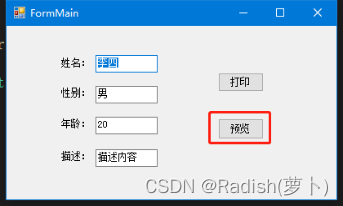
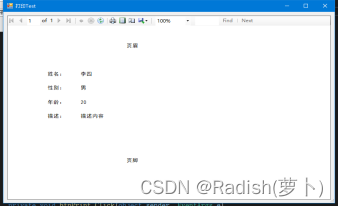
- 显示效果。
使用实例:https://download.csdn.net/download/sunsddd/87922367