

60_1简单的学生管理系统【功能实现(查看所有学生(分页)、修改和删除学生信息)】
创始人
2024-11-12 16:08:53
功能实现
老师角色查看所有学生
获取学生列表和分页
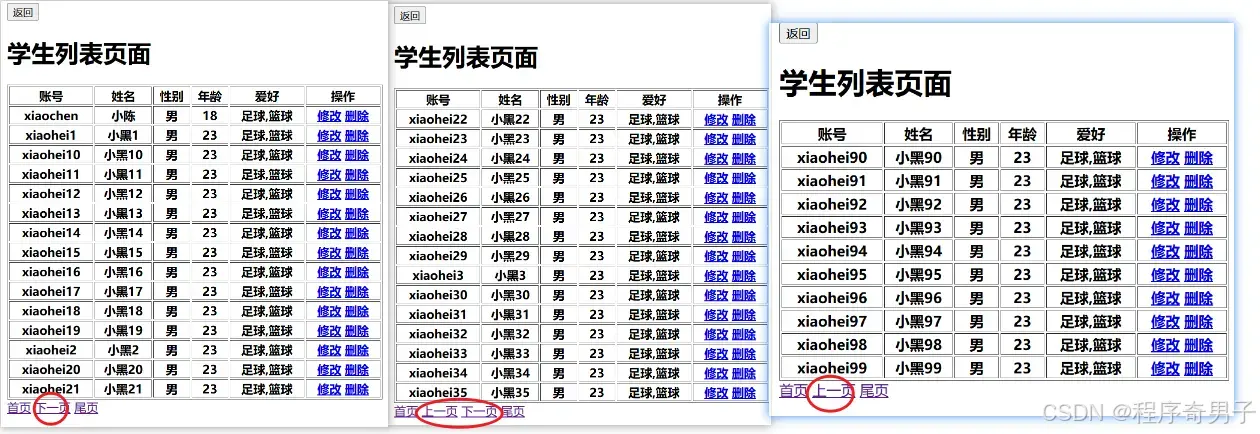
1.修改index.jsp
不能直接跳stuList.jsp,没数据
<%if("teacher".equals(role)){%> ">修改信息 查看所有学生 <%}%> 2.新增GetStuListServlet
拿数据和分页
@WebServlet("/GetStuListServlet") public class GetStuListServlet extends HttpServlet { @Override protected void doGet(HttpServletRequest request, HttpServletResponse response) throws ServletException, IOException { this.doPost(request, response); } @Override protected void doPost(HttpServletRequest request, HttpServletResponse response) throws ServletException, IOException { request.setCharacterEncoding("UTF-8"); response.setContentType("text/html;charset=UTF-8"); //获取当前页数 int curPage = Integer.parseInt(request.getParameter("curPage")); //设置当前页的数据条数 int count = 15; //计算偏移量 int offset = (curPage-1)*count; //计算总页数 int totalPage; try { int allCount = DBUtils.getAllCount("student"); if(allCount % count == 0){ totalPage = allCount/count; }else{ totalPage = allCount/count + 1; } } catch (SQLException e) { throw new RuntimeException(e); } //从数据库获取学生的集合 List students = null; try { students = DBUtils.commonQueryList(Student.class, "select * from student limit ?,?", offset, count); } catch (SQLException e) { throw new RuntimeException(e); } //处理学生集合 List studentDtos = DtoUtils.studentDtoListHandler(students); //将数据存入到请求对象中 request.setAttribute("curPage",curPage); request.setAttribute("totalPage",totalPage); request.setAttribute("studentDtos",studentDtos); //request.setAttribute("students",students);直接传 //跳转 request.getRequestDispatcher("stuList.jsp").forward(request,response); } } 修改DBUtils–分页
新增getAllCount()
/** * 获取当前表的总条数 */ public static int getAllCount(String table) throws SQLException { Connection connection = getConnection(); String sql = "select count(1) from " + table; PreparedStatement statement = connection.prepareStatement(sql); ResultSet resultSet = statement.executeQuery(); if(resultSet.next()){ int allCount = resultSet.getInt(1); return allCount; } return 0; } 修改Student–分页
做假数据,在实体类里面可以写main方法,插入操作
//做分页的假数据 public static void main(String[] args) { for (int i = 1; i < 100; i++) { String username = "xiaohei" + i; String password = "123123"; String name = "小黑" + i; String sex = "man"; int age = 23; String[] hobbies = {"football","basketball"}; try { DBUtils.commonUpdate("insert into student(username,password,name,sex,age,hobbies) values(?,?,?,?,?,?)",username,password,name,sex,age, StringUtils.handleArray(hobbies)); } catch (SQLException e) { throw new RuntimeException(e); } } } 新增StudentDto–处理学生信息
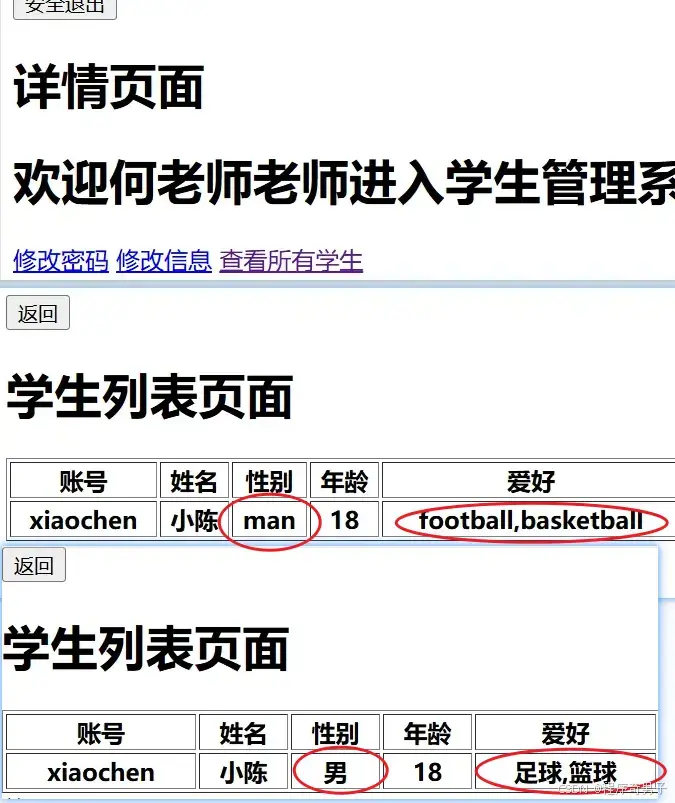
分包新增信息处理类,以方便工具类对学生的信息处理
package com.ckl.dto; import com.ckl.pojo.Student; public class StudentDto { private Student student; private String sex; private String hobbies; //自动生成方法略 } 新增DtoUtils --处理学生信息
工具类,处理学生信息提升页面展示效果
public class DtoUtils { public static StudentDto studentDtoHandler(Student student){ //处理学生的性别数据 String sex = student.getSex(); if("man".equals(sex)){ sex = "男"; }else if("woman".equals(sex)){ sex = "女"; } //处理学生的爱好数据 String hobbies = student.getHobbies(); hobbies = hobbies.replaceAll("football","足球"); hobbies = hobbies.replaceAll("basketball","篮球"); hobbies = hobbies.replaceAll("shop","购物"); //创建StudentDto StudentDto studentDto = new StudentDto(student, sex, hobbies); return studentDto; } public static List studentDtoListHandler(List students){ List studentDtos = new ArrayList<>(); for (Student student : students) { StudentDto studentDto = studentDtoHandler(student); studentDtos.add(studentDto); } return studentDtos; } } 3.stuList.jsp
直接获取数据库的学生数据
//未处理 List students = (List) request.getAttribute("students"); <%for(Student student:students){%> <%=student.getUsername()%> <%=student.getName()%> <%=student.getSex()%> <%=student.getAge()%> <%=student.getHobbies()%> 添加学生信息处理后获取
//处理后 <%@ page import="java.util.List" %> <%@ page import="com.qf.pojo.Student" %> <%@ page import="com.qf.dto.StudentDto" %> <%@ page contentType="text/html;charset=UTF-8" language="java" %> Title <% List studentDtos = (List) request.getAttribute("studentDtos"); int curPage = (int) request.getAttribute("curPage"); int totalPage = (int) request.getAttribute("totalPage"); %> 学生列表页面
账号 姓名 性别 年龄 爱好 操作 //获取学生信息展示 <%for(StudentDto studentDto:studentDtos){%> <%=studentDto.getStudent().getUsername()%> <%=studentDto.getStudent().getName()%> <%=studentDto.getSex()%> <%=studentDto.getStudent().getAge()%> <%=studentDto.getHobbies()%> 修改 删除 <%}%>
//分页 首页 <%if(curPage > 1){%> ">上一页 <%}%> <%if(curPage < totalPage){%> ">下一页 <%}%> ">尾页 老师角色修改和删除学生信息
修改
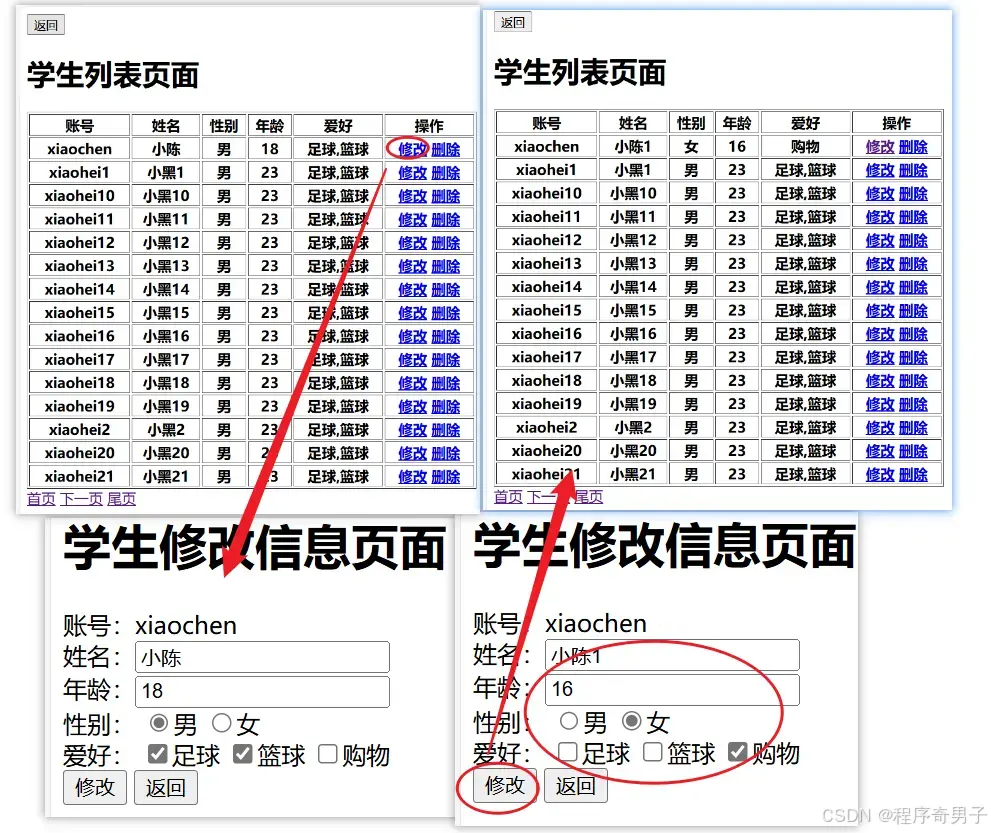
修改stuList.jsp
<%for(StudentDto studentDto:studentDtos){%> ">修改 ">删除 <%}%> 修改StuModifyServlet
获取角色
通过角色判断修改
学生需要更新Session、Cookie里的数据,跳转详情页面
老师跳转GetStuListServlet,需要更新数据【因为修改了需要刷新页面】
// request.setAttribute("name",name); // response.addCookie(CookieUtils.createCookie("name",name,60*60*24*5)); // // response.sendRedirect("index.jsp"); String role = (String) request.getSession().getAttribute("role"); if("student".equals(role)){ //更新Session里的数据 request.getSession().setAttribute("name",name); //更新Cookie里的数据 response.addCookie(CookieUtils.createCookie("name",name,60*60*24*5)); //跳转详情页面 response.sendRedirect("index.jsp"); }else if("teacher".equals(role)){ //跳转 response.sendRedirect("GetStuListServlet?curPage=1"); } 删除
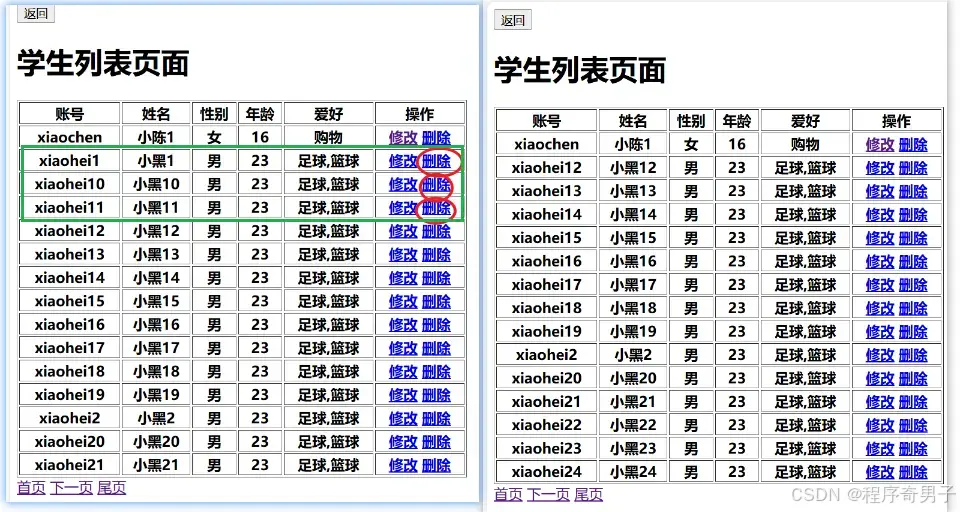
新增StuDeleteServlet
设置编码格式,获取请求中的账号,通过学生账号删除学生,最后跳转GetStuListServlet同时更新数据
注意:实际开发项目中是不会直接用delete,而是改状态,数据库有提到
@WebServlet("/StuDeleteServlet") public class StuDeleteServlet extends HttpServlet { @Override protected void doGet(HttpServletRequest request, HttpServletResponse response) throws ServletException, IOException { this.doPost(request, response); } @Override protected void doPost(HttpServletRequest request, HttpServletResponse response) throws ServletException, IOException { request.setCharacterEncoding("UTF-8"); response.setContentType("text/html;charset=UTF-8"); String username = request.getParameter("username"); try { DBUtils.commonUpdate("delete from student where username=?",username); } catch (SQLException e) { throw new RuntimeException(e); } //跳转 response.sendRedirect("GetStuListServlet?curPage=1"); } } 相关内容
热门资讯
裸辞做“一人公司”,我后悔了
去年这个时候,一位以色列程序员正在东南亚旅行。他顺手把一个在脑子里转了很久的想法做成了产品,一个让任...
南京建成国内首个Pre-6G试...
4月21日,2026全球6G技术与产业生态大会在南京开幕。全息互动技术展台前,一名远在北京的工作人员...
超梵求职受邀参加“2025抖音...
超梵求职受邀参加“2025抖音巨量引擎成人教育行业生态大会”,探讨分享优质内容传播,服务万千学员。 ...
摩托罗拉Razr 2026(R...
IT之家 4 月 22 日消息,摩托罗拉宣布新一代 Razr 折叠手机将于 4 月 29 日在美国发...
库克卸任,特纳斯领航:苹果新纪...
苹果首席执行官蒂姆·库克将卸任,硬件工程主管约翰·特纳斯将接任,苹果公司今天宣布此事。 库克将在夏季...