

C#编写软件发布公告1——客户端
创始人
2024-11-12 21:10:46
前言
软件或者生活中有时需要将信息同步至电子公告板上,利用C#可以快速实现这一目的,这里以软件公告场景设计,主要是将软件的版本号等相关信息同步至服务器,同步成功后,任务需要查找的人员只要有Web浏览器就可以快速查看更新信息;如果在社区公告场景也可以如法炮制。
一、界面效果展示
1、启动界面
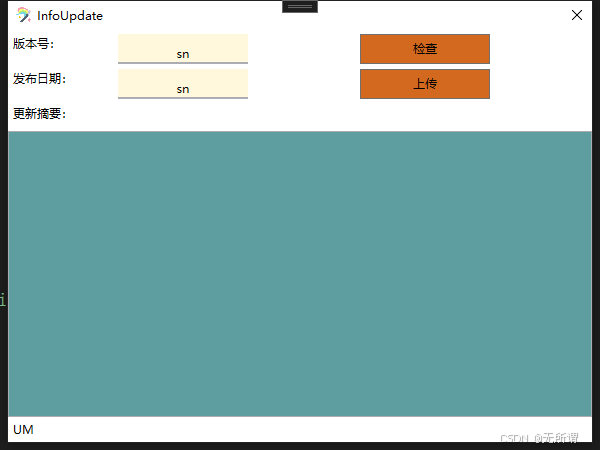
2、后台配置文件
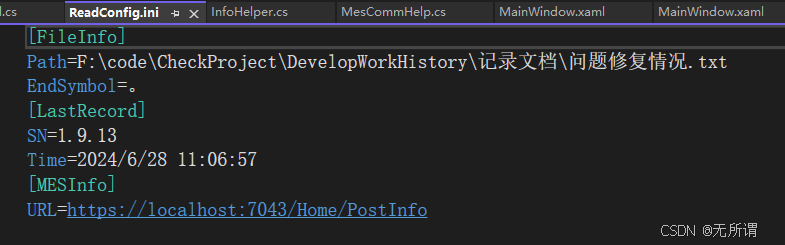
3、读取数据
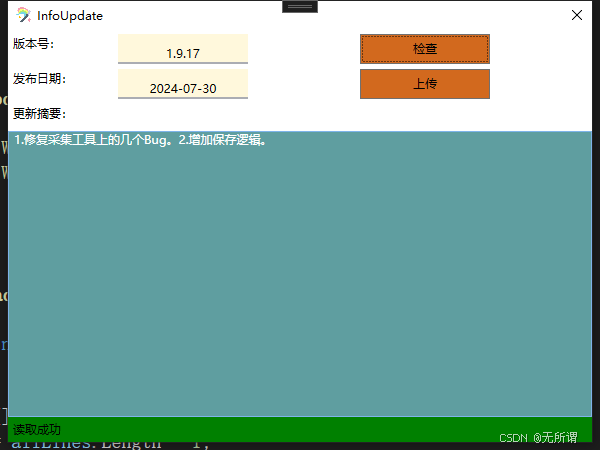
4、上传
客户端操作: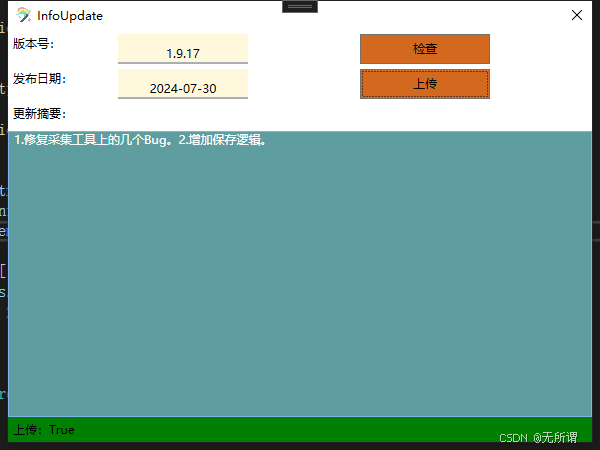
5、结果
服务器显示:

二、实际代码
注意: 这里只是列举主要逻辑代码。
1、Web访问类
利用C#提供的HttpWebRequest来进行Web访问(由于是CS这种结构,所以这个服务端也可以用其他语言进行编写,同理客户端也可以是多种语言进行编写),根据实际情况封装Post和Get请求。
private string Post(string str, string url) { string result = ""; HttpWebRequest httpWebRequest = (HttpWebRequest)WebRequest.Create(url+"?"+str); httpWebRequest.Method = "POST"; httpWebRequest.ContentType = "application/json; charset=UTF-8"; httpWebRequest.Timeout = 5000; //byte[] bytes = Encoding.UTF8.GetBytes(str); //httpWebRequest.ContentLength = (long)bytes.Length; using (StreamReader streamReader = new StreamReader(((HttpWebResponse)httpWebRequest.GetResponse()).GetResponseStream(), Encoding.UTF8)) { result = streamReader.ReadToEnd(); } return result; } private string Get(string url) { // ServicePointManager.ServerCertificateValidationCallback = new RemoteCertificateValidationCallback(MesCommHelp.CheckValidationResult); string result = ""; HttpWebRequest httpWebRequest = (HttpWebRequest)WebRequest.Create(url); httpWebRequest.Method = "GET"; httpWebRequest.ContentType = "application/json; charset=UTF-8"; httpWebRequest.Timeout = 2000; using (StreamReader streamReader = new StreamReader(((HttpWebResponse)httpWebRequest.GetResponse()).GetResponseStream(), Encoding.UTF8)) { result = streamReader.ReadToEnd(); } return result; } 2、Ini配置读写类
public string INIGetStringValue(string section, string key, string defaultValue) { string value = defaultValue; const int SIZE = 1024; if (string.IsNullOrEmpty(section)) { throw new ArgumentException("必须指定节点名称", "section"); } if (string.IsNullOrEmpty(key)) { throw new ArgumentException("必须指定键名称(key)", "key"); } StringBuilder sb = new StringBuilder(SIZE); uint bytesReturned = GetPrivateProfileString(section, key, defaultValue, sb, SIZE, _iniFile); if (bytesReturned != 0) { value = sb.ToString(); } sb = null; return value; } public bool INIWriteValue(string section, string key, string value) { if (string.IsNullOrEmpty(section)) { throw new ArgumentException("必须指定节点名称", "section"); } if (string.IsNullOrEmpty(key)) { throw new ArgumentException("必须指定键名称", "key"); } if (value == null) { throw new ArgumentException("值不能为null", "value"); } return WritePrivateProfileString(section, key, value, _iniFile); } 3、业务中心类
1、配置信息读取
private void ReadInfo() { BaseUrl = iniHelp.INIGetStringValue("MESInfo", "URL", ""); LastSn = iniHelp.INIGetStringValue("LastRecord", "SN", ""); LastDataTime = iniHelp.INIGetStringValue("LastRecord", "Time", ""); RecordFileName = iniHelp.INIGetStringValue("FileInfo", "Path", ""); EndSymbol = iniHelp.INIGetStringValue("FileInfo", "EndSymbol", "EndSymbol"); } 2、公告文件读取
public bool ReadFileInfo(out InfoItem infoItem) { infoItem = new InfoItem(); try { string[] allLines = File.ReadAllLines(RecordFileName); int i = allLines.Length - 1; bool IsHave = false; int endIndex = -1; for (; i > 0; i--) { if (string.IsNullOrEmpty(allLines[i])) { if (IsHave) { break; } } else { if (!IsHave) { IsHave = true; endIndex = i; } } } i = i + 1; string firstRow = allLines[i]; string descInfo = string.Empty; for (int j = i + 1; j <= endIndex; j++) { string item = allLines[j]; if (!item.EndsWith(EndSymbol)) { item += EndSymbol; } string[] arrs= item.Split('、'); if (arrs.Length>1) { if (int.TryParse( arrs[0],out int id)) { Console.WriteLine("切割后处理:" + arrs[0]); item = item.Replace(arrs[0] + "、", arrs[0] + "."); } } descInfo += item; } string[] strs = firstRow.Split(' '); infoItem = new InfoItem(strs[1], strs[0], descInfo); return true; } catch (System.Exception ex) { ErrStr = ex.Message; return false; } } 3、保存更新记录
private void UpdataRecordToIni(string sn) { iniHelp.INIWriteValue("LastRecord", "SN", sn); iniHelp.INIWriteValue("LastRecord", "Time", DateTime.Now.ToString()); } 4、提交更新信息
internal bool UpdataRecord(InfoItem infoItem) { string info = $"SN={infoItem.SN}&Datetime={infoItem.DateTime}&Info={ infoItem.DescrInfo}"; try { string res = mes.ExePost(info, BaseUrl); if (res.Contains("成功")) { UpdataRecordToIni(infoItem.SN); return true; } ErrStr = "服务器响应消息为失败"; return false; } catch (System.Exception ex) { ErrStr = ex.Message; return false; } } 5、信息检测
private bool CheckInfo(string sn, string dateInfo, string str) { if (string.IsNullOrEmpty(sn)) { SetInfo("版本号不能为空", false); return false; } if (!Regex.IsMatch(sn, "^(?\\d{1,2})\\.(?\\d{1,2})\\.(?\\d{1,2})$")) { SetInfo("版本号格式不正确", false); return false; } if (string.IsNullOrEmpty(dateInfo)) { SetInfo("日期不能为空", false); return false; } if (!Regex.IsMatch(dateInfo, "^(?\\d{2,4})-(?\\d{1,2})-(?\\d{1,2})$")) { SetInfo("日期格式不正确", false); return false; } if (string.IsNullOrEmpty(str)) { SetInfo("描述信息不能为空", false); return false; } return true; }
上一篇:Java云原生技术概述
相关内容
热门资讯
裸辞做“一人公司”,我后悔了
去年这个时候,一位以色列程序员正在东南亚旅行。他顺手把一个在脑子里转了很久的想法做成了产品,一个让任...
南京建成国内首个Pre-6G试...
4月21日,2026全球6G技术与产业生态大会在南京开幕。全息互动技术展台前,一名远在北京的工作人员...
超梵求职受邀参加“2025抖音...
超梵求职受邀参加“2025抖音巨量引擎成人教育行业生态大会”,探讨分享优质内容传播,服务万千学员。 ...
摩托罗拉Razr 2026(R...
IT之家 4 月 22 日消息,摩托罗拉宣布新一代 Razr 折叠手机将于 4 月 29 日在美国发...
库克卸任,特纳斯领航:苹果新纪...
苹果首席执行官蒂姆·库克将卸任,硬件工程主管约翰·特纳斯将接任,苹果公司今天宣布此事。 库克将在夏季...