

Spine3.8.75如何应用到Unity(包括SpinePro3.8.75)
创始人
2024-11-13 08:37:31
Spine3.8.75(包括SpinePro3.8.75)是不能在Unity上运行的,因为代码把它禁掉了,解决方法如下
前期准备:
下载Unity版本的Spine运行时库导入到Unity工程
This Spine-Unity runtime works with data exported from Spine Editor version: 3.8.xx
Package version: spine-unity-3.8-2020-03-23.unitypackage
1.Spine里用二进制导出
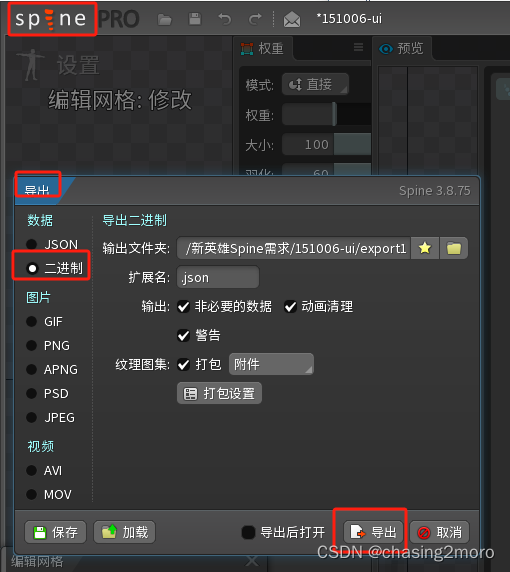
2.修改文件
导出后得到3份文件如下:
texture.skel.atlas
texture.skel.json
texture.skel.png
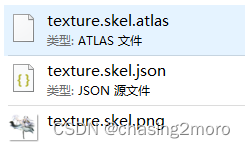
atlas和skel文件 重命名为如下
texture.atlas.txt
texture.skel.bytes
texture.skel.png

3.解决报错(3.1和3.2任选一种)
3.1修改Spine库文件
然后去文件
Spine\Runtime\spine-csharp\SkeletonBinary.cs
把这2行代码注释掉
if ("3.8.75" == skeletonData.version)
throw new Exception("Unsupported skeleton data, please export with a newer version of Spine.");
3.2修改版本号
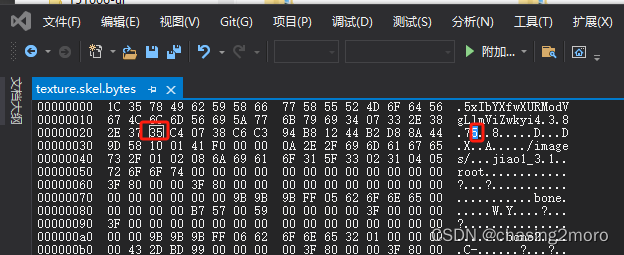
如果运行时库不能改,直接改skel的版本号3.8.75改成3.8.74
如下图
4.导入工程
拖动到Unity工程
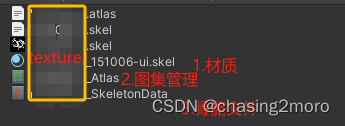
如果自动生成 如图这3份文件即成功
相关内容
热门资讯
裸辞做“一人公司”,我后悔了
去年这个时候,一位以色列程序员正在东南亚旅行。他顺手把一个在脑子里转了很久的想法做成了产品,一个让任...
南京建成国内首个Pre-6G试...
4月21日,2026全球6G技术与产业生态大会在南京开幕。全息互动技术展台前,一名远在北京的工作人员...
超梵求职受邀参加“2025抖音...
超梵求职受邀参加“2025抖音巨量引擎成人教育行业生态大会”,探讨分享优质内容传播,服务万千学员。 ...
摩托罗拉Razr 2026(R...
IT之家 4 月 22 日消息,摩托罗拉宣布新一代 Razr 折叠手机将于 4 月 29 日在美国发...
库克卸任,特纳斯领航:苹果新纪...
苹果首席执行官蒂姆·库克将卸任,硬件工程主管约翰·特纳斯将接任,苹果公司今天宣布此事。 库克将在夏季...