前言
最近在研究etcd,用于解决一个服务的主备切换的问题,工欲善其事必先利其器,先把本地所需的所有环境搭建好。涉及到本地Windows环境的etcd集群的搭建,以及etcd可视化web工具etcd-viewer的搭建。etcd使用go语言开发的,在Windows平台上最终编译成了可执行的exe文件,部署非常容易。
安装etcd集群
下载etcd后,选择对应的版本下载即可,Windows版本解压后文件目录如下:
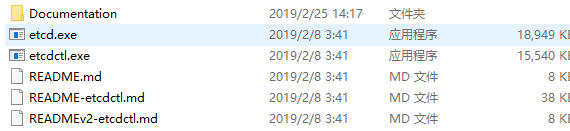
在同级目录分别创建如下三个启动脚本:
start01.bat
1 2 3 4 5 6 7 8 9 10 11 | .\etcd.exe --name etcd01 ^
--data-dir.\data\etcd01 ^
--advertise-client-urls http://127.0.0.1:2379 ^
--listen-client-urls http://127.0.0.1:2379 ^
--listen-peer-urls http://127.0.0.1:2380 ^
--initial-advertise-peer-urls http://127.0.0.1:2380 ^
--initial-cluster-token etcd-cluster-1 ^
--initial-cluster etcd01=http://127.0.0.1:2380,etcd02=http://127.0.0.1:2381,etcd03=http://127.0.0.1:2382 ^
--initial-cluster-state new
pause
|
start02.bat
1 2 3 4 5 6 7 8 9 10 11 | .\etcd.exe --name etcd02 ^
--data-dir.\data\etcd02 ^
--advertise-client-urls http://127.0.0.1:3379 ^
--listen-client-urls http://127.0.0.1:3379 ^
--listen-peer-urls http://127.0.0.1:2381 ^
--initial-advertise-peer-urls http://127.0.0.1:2381 ^
--initial-cluster-token etcd-cluster-1 ^
--initial-cluster etcd01=http://127.0.0.1:2380,etcd02=http://127.0.0.1:2381,etcd03=http://127.0.0.1:2382 ^
--initial-cluster-state new
pause
|
start03.bat
1 2 3 4 5 6 7 8 9 10 11 | .\etcd.exe --name etcd03 ^
--data-dir.\data\etcd03 ^
--advertise-client-urls http://127.0.0.1:4379 ^
--listen-client-urls http://127.0.0.1:4379 ^
--listen-peer-urls http://127.0.0.1:2382 ^
--initial-advertise-peer-urls http://127.0.0.1:2382 ^
--initial-cluster-token etcd-cluster-1 ^
--initial-cluster etcd01=http://127.0.0.1:2380,etcd02=http://127.0.0.1:2381,etcd03=http://127.0.0.1:2382 ^
--initial-cluster-state new
pause
|
然后在同级目录下创建好对应的data-dir,如/data/etcd01、/data/etcd02、/data/etcd03,创建好后,依次启动start01.bat、start02.bat、start03.bat三个脚本,然后使用etcdctl.exe member list,当输出如下信息时,代表集群创建成功了。
1 2 3 4 | E:\runtime\etcd-v3.3.12-windows-amd64>etcdctl.exe member list
19ac17627e3e396f: name=etcd03 peerURLs=http://127.0.0.1:2382 clientURLs=http://127.0.0.1:4379 isLeader=false
bf9071f4639c75cc: name=etcd01 peerURLs=http://127.0.0.1:2380 clientURLs=http://127.0.0.1:2379 isLeader=true
e7b968b9fb1bc003: name=etcd02 peerURLs=http://127.0.0.1:2381 clientURLs=http://127.0.0.1:3379 isLeader=false
|
如果出现如下的信息,代表可能etcd启动过程阻塞住了,只要在cmd窗口里按下回车键就ok了
1 2 3 | E:\runtime\etcd-v3.3.12-windows-amd64>etcdctl.exe member list
client: etcd cluster is unavailable or misconfigured; error #0: dial tcp 127.0.0.1:4001: connectex: No connection could be made because the target machine actively refused it.
; error #1: client: endpoint http://127.0.0.1:2379 exceeded header timeout
|
安装etcd-viewer
etcd-viewer是一款同时支持v2和v3版本接口的etcd可视化web服务,使用java开发,底层基于jetcd和Apache cxf。etcd-viewer也是etcd官方推荐的一个可视化组件
项目地址:https://github.com/nikfoundas/etcd-viewer
1、etcd-viewer已经提供了docker镜像,并上传到了中央仓库,使用如下docker脚本可以直接运行:
1 | docker run -d -p 8080:8080 nikfoundas/etcd-viewer
|
2、或者下载源码后,导入到IDEA,使用mvn jetty:run运行
3、打包成war包后,丢到tomcat中运行
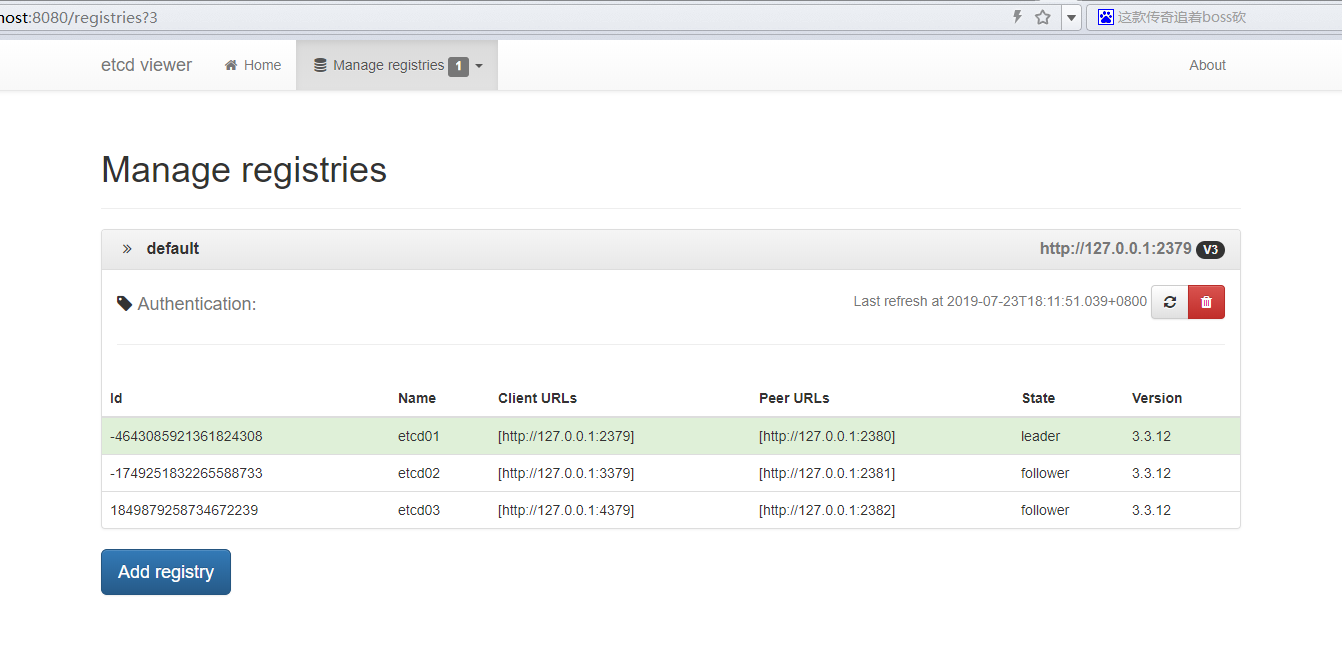
安装成功后,界面如下