

react-native 从入门到实战系列教程一底部导航及页面切换
创始人
2024-11-13 09:40:39
react-native 里面的导航有点繁琐,需要引入 react-navigation 这个库。也是官网推荐的。整个过程不难,就是配置比较繁琐,还会因为网络的原因,时常报错,需要多试几次。排查错误,需要多看文档。安装完依赖,必须重启项目。
效果演示

实现步骤
- 安装
npm i @react-navigation/native npm i @react-navigation/bottom-tabs - 页面使用
import React, {useEffect, useState} from 'react'; import {NavigationContainer} from '@react-navigation/native'; import {createBottomTabNavigator} from '@react-navigation/bottom-tabs'; import Ionicons from 'react-native-vector-icons/Ionicons'; import { StyleSheet, Button, View, SafeAreaView, Text, Alert, ActivityIndicator, } from 'react-native'; const Separator = () => styles.separator} />; const Loading = () => ( styles.loadingContainer}> 加载中... ); function HomeScreen() { return ( { flex: 1, justifyContent: 'center', alignItems: 'center', width: '100%', }}> Home! ); } function SettingsScreen() { return ( { flex: 1, justifyContent: 'center', alignItems: 'center', width: '100%', }}> Settings! ); } function UserCenter() { return ( { flex: 1, justifyContent: 'center', alignItems: 'center', width: '100%', }}> User Center ); } const Tab = createBottomTabNavigator(); const App = () => { const [isLoading, setIsLoading] = useState(true); const handleSubmit = () => { Alert.alert( '提交成功', '您的信息已提交,我们会尽快与您联系!', [{text: '好的'}], {cancelable: false}, ); }; const handleSubmit2 = () => { Alert.alert('提交成功', '您的信息已提交,请耐心等待!', [{text: '好的'}], { cancelable: false, }); }; useEffect(() => { setTimeout(() => { setIsLoading(false); }, 3000); }); return ( styles.container}> {isLoading ? ( ({route}) => ({ tabBarIcon: ({focused, color, size}) => { let iconName; if (route.name === '消息') { iconName = focused ? 'chatbubble-ellipses-sharp' : 'chatbubble-outline'; } else if (route.name === '工作台') { iconName = focused ? 'desktop' : 'desktop-outline'; } else if (route.name === '我的') { iconName = focused ? 'person-circle' : 'person-circle-outline'; } return iconName} size={size} color={color} />; }, tabBarActiveTintColor: 'tomato', tabBarInactiveTintColor: 'gray', })}> HomeScreen} options={{ tabBarBadge: 3, }} /> SettingsScreen} /> UserCenter} /> )} ); }; const styles = StyleSheet.create({ container: { flex: 1, width: '100%', justifyContent: 'center', }, loadingContainer: { flex: 1, justifyContent: 'center', marginHorizontal: 16, alignItems: 'center', }, title: { textAlign: 'center', marginVertical: 8, }, fixToText: { flexDirection: 'row', justifyContent: 'space-between', }, separator: { marginVertical: 8, //垂直距离 borderBottomColor: '#737373', //底部边框颜色 borderBottomWidth: StyleSheet.hairlineWidth, //底部边框宽度 }, tinyLogo: { width: 50, height: 50, }, content: { marginVertical: 16, textAlign: 'left', }, }); export default App; 默认情境下,图标是展示的一个打叉的矩形,需要我们配置好图标,才能正常展示。
配置图标
- 安装依赖
npm i react-native-vector-icons 配置图标
我这里是安卓,请按照安卓的操作方法配置,https://www.npmjs.com/package/react-native-vector-icons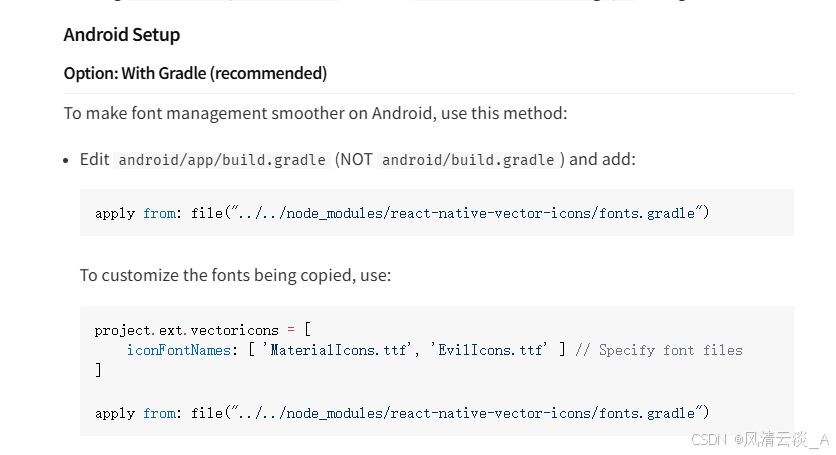
把安装包下面的字体文件夹改为小写,放到指定的位置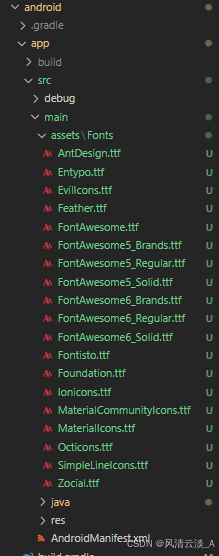
- 查找图标,要参考官方文档:https://oblador.github.io/react-native-vector-icons/#Ionicons
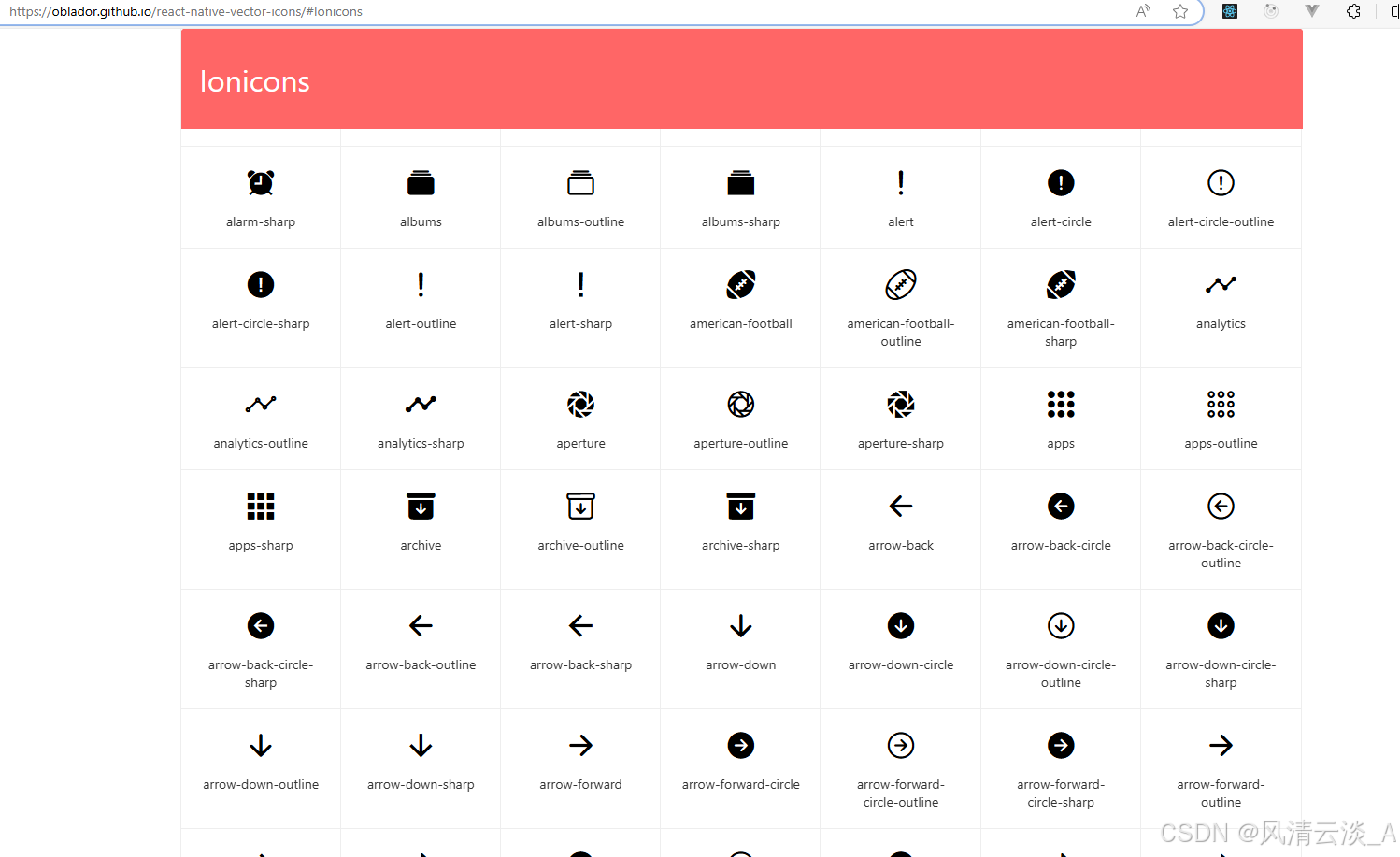
- 查找图标,要参考官方文档:https://oblador.github.io/react-native-vector-icons/#Ionicons
参考导航的使用方法。
react-navigation 的官网: https://reactnavigation.org/docs/tab-based-navigation
这样我们就实现了一个导航效果,然后我们就可以继续丰富我们app的细节内容
相关内容
热门资讯
裸辞做“一人公司”,我后悔了
去年这个时候,一位以色列程序员正在东南亚旅行。他顺手把一个在脑子里转了很久的想法做成了产品,一个让任...
南京建成国内首个Pre-6G试...
4月21日,2026全球6G技术与产业生态大会在南京开幕。全息互动技术展台前,一名远在北京的工作人员...
超梵求职受邀参加“2025抖音...
超梵求职受邀参加“2025抖音巨量引擎成人教育行业生态大会”,探讨分享优质内容传播,服务万千学员。 ...
摩托罗拉Razr 2026(R...
IT之家 4 月 22 日消息,摩托罗拉宣布新一代 Razr 折叠手机将于 4 月 29 日在美国发...
库克卸任,特纳斯领航:苹果新纪...
苹果首席执行官蒂姆·库克将卸任,硬件工程主管约翰·特纳斯将接任,苹果公司今天宣布此事。 库克将在夏季...