

springboot整合 knife4j 接口文档
创始人
2024-11-19 07:06:13
第一步:引入依赖
com.github.xiaoymin knife4j-openapi2-spring-boot-starter 4.4.0 第二步:写入配置
方法一:编写一个工具类
import org.springframework.context.annotation.Bean; import org.springframework.context.annotation.Configuration; import springfox.documentation.builders.ApiInfoBuilder; import springfox.documentation.builders.PathSelectors; import springfox.documentation.builders.RequestHandlerSelectors; import springfox.documentation.service.ApiInfo; import springfox.documentation.service.Contact; import springfox.documentation.spi.DocumentationType; import springfox.documentation.spring.web.plugins.Docket; import springfox.documentation.swagger2.annotations.EnableSwagger2WebMvc; @Configuration @EnableSwagger2WebMvc public class Knife4jConfiguration { private ApiInfo groupApiInfo(){ return new ApiInfoBuilder() .title("herbig接口文档") .description("Smart Claims RESTful APIs") .termsOfServiceUrl("http://localhost:8077/") .contact(new Contact("herbig祺","","邮箱")) .description("测试描述") .version("4.0") .build(); } @Bean public Docket appApi() { return new Docket(DocumentationType.SWAGGER_2) .apiInfo(groupApiInfo()) .groupName("移动端接口") .select() .apis(RequestHandlerSelectors.basePackage("com.herbig.app")) .paths(PathSelectors.any()) .build(); } @Bean public Docket pcApi() { return new Docket(DocumentationType.SWAGGER_2) .apiInfo(groupApiInfo()) .groupName("网页端接口") .select() .apis(RequestHandlerSelectors.basePackage("com.herbig.pc")) .paths(PathSelectors.any()) .build(); } } 方法二:在yml里面配置
knife4j: enable: true openapi: title: herbig接口文档 description: 测试描述 email: 邮箱 concat: herbig祺 url: http://localhost:8077/ version: v4.0 license: Apache 2.0 license-url: http://localhost:8077/ terms-of-service-url: http://localhost:8077/ group: test1: group-name: 移动端接口 api-rule: package api-rule-resources: - com.knife4j.demo.new3 test2: group-name: 网页端接口 api-rule: package api-rule-resources: - com.knife4j.demo.new3第三步:启动项目——访问地址 http://ip:端口号/doc.html#/
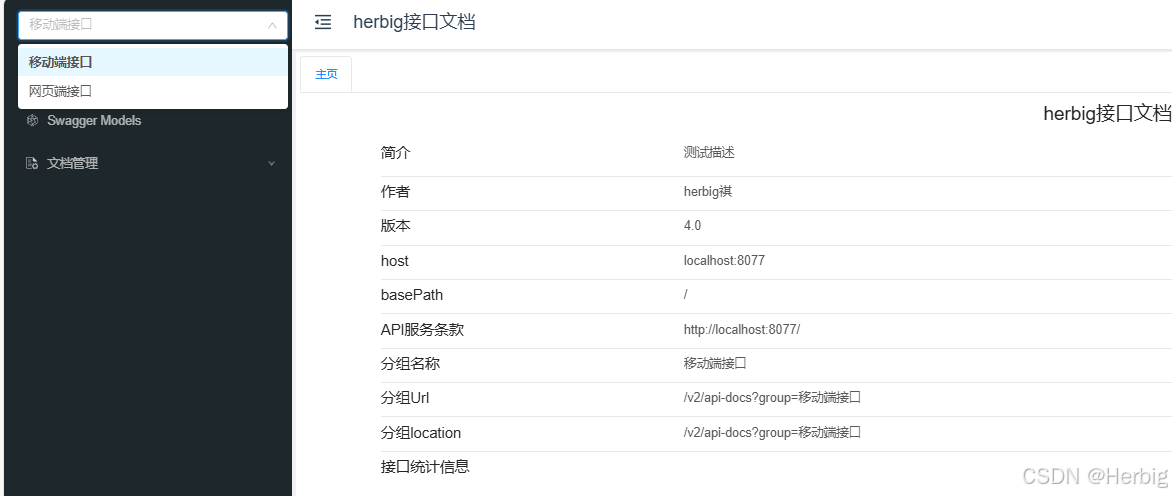
番外:如果提供给别人接口API时不希望所有人都能看到可以加一些登录限制 在yml文件中
knife4j: enable: true basic: enable: true password: 123123 username: 123123这样访问地址就会出现登录提示,出入用户名和密码即可查看
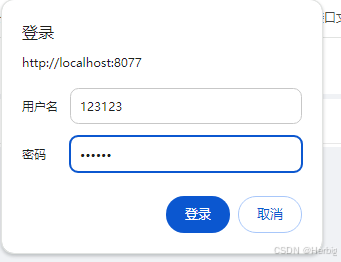
测试用例:
@RestController @RequestMapping("/one") @Api(value = "测试接口",tags = "测试接口")//接口文档的api组名 public class Knife4jController { @ApiOperation(value = "接口释义", notes = "接口释义")//接口释义 @RequestMapping(value = "/two", method = RequestMethod.POST) @ApiImplicitParams({ @ApiImplicitParam(name = "canshu", value = "参数", required = false)//参数 required是否必填 }) public String doGetStudyFileDataList() { return "啦啦啦,成功了"; } }结果

下一篇:home键作用是什么
相关内容
热门资讯
刚刚,Claude最新功能泄露...
新智元报道 编辑:定慧 大卫 【新智元导读】2026年5月4日,testingcatalog在An...
高分辨大宽带集成光子光谱仪成功...
麦姆斯咨询获悉,近日,中国科学院南京天文光学技术研究所天文光子学团队在面向天文观测的高分辨大宽带集成...
性价比高又稳定的云手机哪个好?...
作为搬了4年砖、踩过无数云手机坑的老玩家,今天直接给你们唠唠性价比高又稳定的云手机选法,全是实战干货...
以灵石破局,万物云参编国内首部...
4月23日,由低碳智慧建筑产业技术创新战略联盟与北京清华同衡规划设计研究院有限公司主办、万物云作为协...
专访 | CLA成功反哺全球 ...
2026年,是奔驰诞生的140周年,也是奔驰进入中国内地市场的20周年。 140年间,从第一款汽车问...