

如何在Ubuntu中安装Node.js和NPM
创始人
2024-11-28 19:35:36
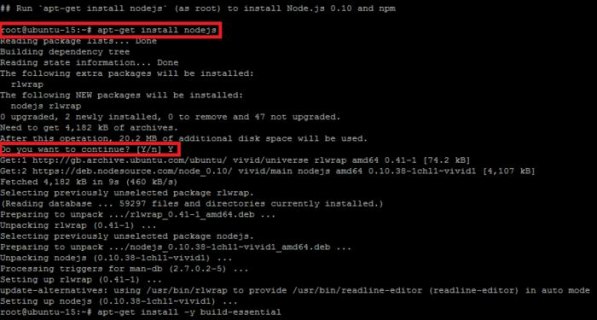
在Ubuntu中安装Node.js和NPM,可以通过以下步骤:,,1. 更新系统软件包列表:,``,sudo apt update,`,,2. 安装Node.js:,`,sudo apt install nodejs,`,,3. 安装NPM:,`,sudo apt install npm,`,,4. 验证安装:,`,nodejs -v,npm -v,``
 (图片来源网络,侵删)
在Ubuntu中安装Node.js和NPM,可以按照以下步骤进行:
1. 更新系统包列表
在安装Node.js和NPM之前,首先需要更新系统的包列表,打开终端,输入以下命令:
sudo apt-get update
2. 安装Node.js
Node.js可以通过官方的NodeSource APT仓库进行安装,添加NodeSource APT仓库:
curl -sL https://deb.nodesource.com/setup_14.x | sudo -E bash -
安装Node.js:
sudo apt-get install -y nodejs
3. 安装NPM
Node.js安装完成后,NPM也会一起被安装,你可以通过以下命令检查Node.js和NPM的版本:
node -v npm -v
 (图片来源网络,侵删)
4. 验证安装
你可以创建一个JavaScript文件,例如test.js,并输入以下内容:
console.log("Hello, Node.js!"); 使用Node.js运行这个文件:
node test.js
如果看到输出"Hello, Node.js!",那么说明Node.js和NPM已经成功安装。
以上就是在Ubuntu中安装Node.js和NPM的详细步骤。
 (图片来源网络,侵删)
上一篇:插上U盘后毫无反应,该怎么办?
相关内容
热门资讯
延安12345 | 拍照只会比...
近日,“剪刀手拍照会泄露指纹信息”冲上热搜,不少网友表示,没想到手指轻轻比个“耶”,竟可能把自己的隐...
填补世界空白的“大国重器”正式...
今天(8日),一项填补世界空白的“大国重器”正式上岗!我国自主研发的全球首套盾构超高压“三元混合气”...
科技助力唱“主角” 数字“新农...
科技助力唱“主角” 数字“新农具”耕出“智慧”丰收田 央视网消息:在湖北黄冈市,依托当地政府打造的...
数字技术赋能乡村振兴——以福建...
胡冰川 当下,数字技术正成为驱动农业农村高质量发展的新质生产力。数字农业以物联网、大数据、人工智能、...
构建智能体EDA方法论:挑战与...
工具与方法论之间的关系是双向的。工具赋能方法论,方法论依赖工具的功能特性及其所提供的数据。然而,当前...